
Switching to Chamberzu

Migration is the reason most chambers stay stuck.

Nobody keeps bad software because they like it. They keep it because moving looks like six months of risk. Here is what it actually involves, in specifics, so you can judge for yourself.

The six things you're worried about

Named, and answered.

These come up in nearly every evaluation call. None of them have a comfortable marketing answer, so here are the real ones.

We'll lose our history.

You won't. Members, contacts, tiers, open invoices, historical invoices, payments, and event attendance all import. Tenure and payment history are the inputs to retention reporting — losing them would cost you the first year of insight, so we treat them as required, not optional.
It'll take six months.

Most chambers go live in one to three weeks. The long pole is data quality, not configuration, which is why we start with a review of your actual export rather than a discovery workshop.

Our data is a mess.

It is. Everyone's is. Duplicates, dead contacts, three spellings of the same company, dues amounts that only make sense to the person who left in 2019. Cleanup is part of migration, not a prerequisite for it — we flag what looks wrong and you make the calls.

We're mid-renewal cycle.

Open invoices import with their existing due dates, so renewals in flight continue on schedule. There is no clean moment to switch, and you don't need one.

Our members will be confused.

The member-facing change is that invoices get payable online and the directory gets better. We give you the announcement email, and we time the cutover so nobody receives duplicate notices from two systems.

We'll be stuck again in five years.

You can export everything you have, at any time, without asking us. That is the only promise about lock-in worth anything, and it is the one we make.

Week two

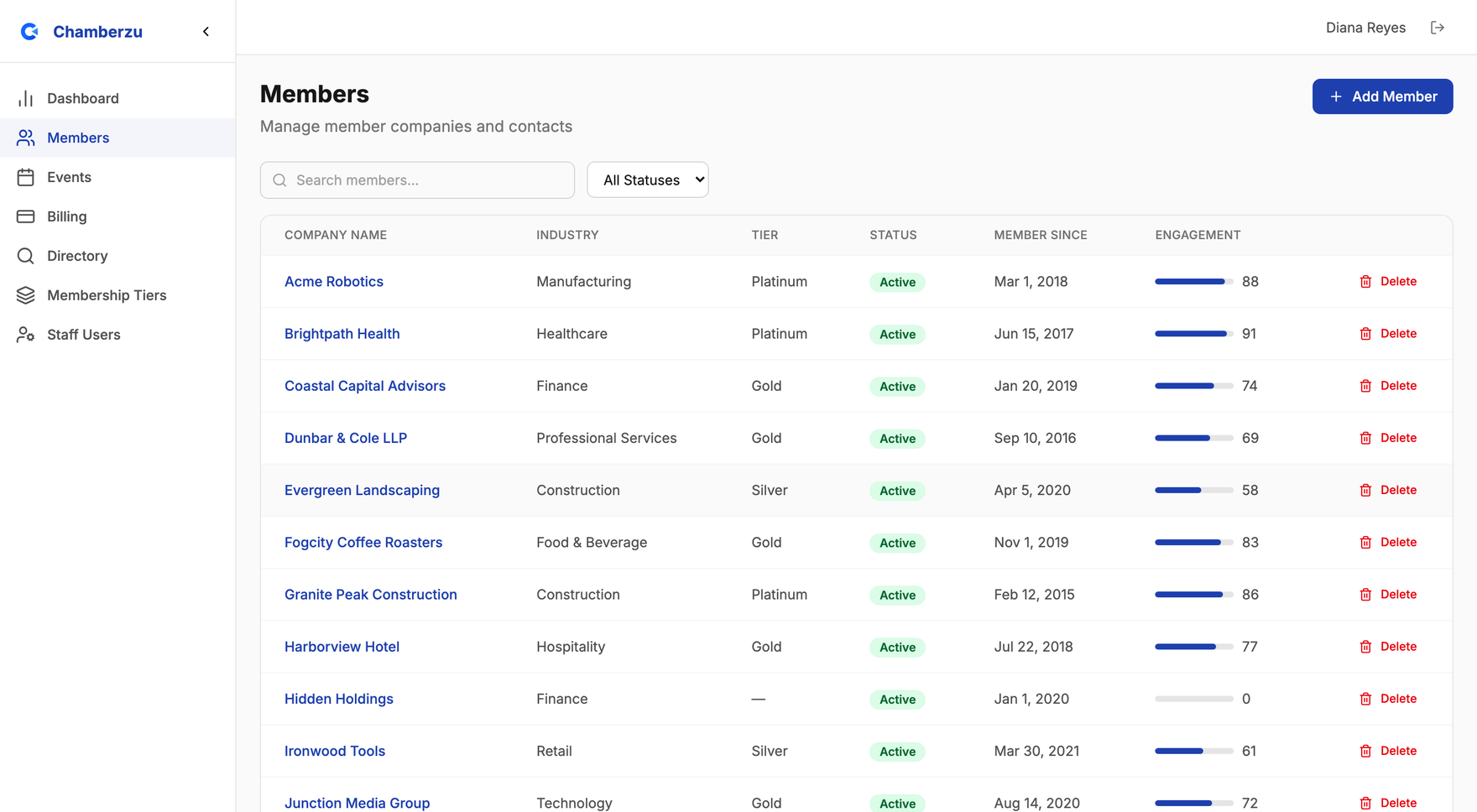
What your roster looks like after import.

This is a real Chamberzu member list — the state your data lands in once we've mapped it. You review it before anything goes live, which is the point at which most chambers spot the twelve records that were already wrong in the old system.

See exactly what imports →

The Chamberzu members list after an import, showing member businesses with tier, industry, status and member-since date.
Tiers, industries, join dates and status — carried across, not retyped.
What happens, when

One to three weeks, start to live.

The variable is the state of your data, not the software. That's why step one is looking at your actual export rather than running a discovery workshop.

  1. Week 1

    Data review and mapping

    You send an export from your current system. We look at what's actually in it — not what the vendor's brochure says should be — and come back with a mapping, a list of ambiguities, and an honest read on the timeline.

    Your part: About two hours to answer questions about tiers, dues amounts, and which records are really still active.

  2. Week 1–2

    Import and review

    We load your data into a working environment and hand it back to you. Nothing is live. You browse your own members, spot the twelve records that look wrong, and tell us.

    Your part: A review pass. You know your membership better than any import script does.

  3. Week 2

    Configuration

    Tiers, dues schedules, renewal reminder cadence, email sending domain, payment account, staff roles, and directory appearance. We do this with you on a call rather than handing you a settings page and a manual.

    Your part: Decisions, mostly. Most chambers finish this in a single session.

  4. Week 2–3

    Go live

    DNS and sending domain cut over, the directory publishes, and the first automated invoice run goes out. We watch the first billing cycle with you and stay close through it.

    Your part: Send the announcement to members. We draft it; you make it sound like you.

Coming from

What we've seen before.

Send us a sample export from whatever you're on and we'll tell you specifically what comes across and what doesn't — before you commit to anything.

A spreadsheet and a payment app

The most common starting point, and the easiest migration. One CSV, one afternoon of mapping. The hard part is deciding which of the four spreadsheets is authoritative.

A legacy association platform

Every major platform can export to CSV or Excel. We have handled the common shapes. Send us a sample export and we will tell you specifically what comes across and what doesn't.

A general-purpose CRM

Salesforce, HubSpot, and similar systems export cleanly, but their data model isn't a chamber's — dues, tiers, and member organizations usually live in custom fields. Mapping those is the work, and it is our work.

A membership WordPress plugin

Exportable, usually via a plugin's own CSV tool or the database directly. Directory URLs are the thing to protect here; we map old URLs to new ones so search rankings and inbound links survive.

The only lock-in promise worth making

You can export every record you have — members, contacts, invoices, payments, events, registrations — at any time, in open formats, without asking us and without a fee. If we stop earning your business, leaving should be a Tuesday afternoon, not a negotiation.

Step one

Send us an export. We'll tell you the truth.

No commitment and no obligation — we look at your real data and give you an honest read on effort, timeline, and what won't come across.

No credit card. No obligation. A real conversation with the people who build the product.